Did you know that you can navigate the posts by swiping left and right?
Load Balancing
28 Dec 2023
. category:
tech
.
Comments
#tutorial
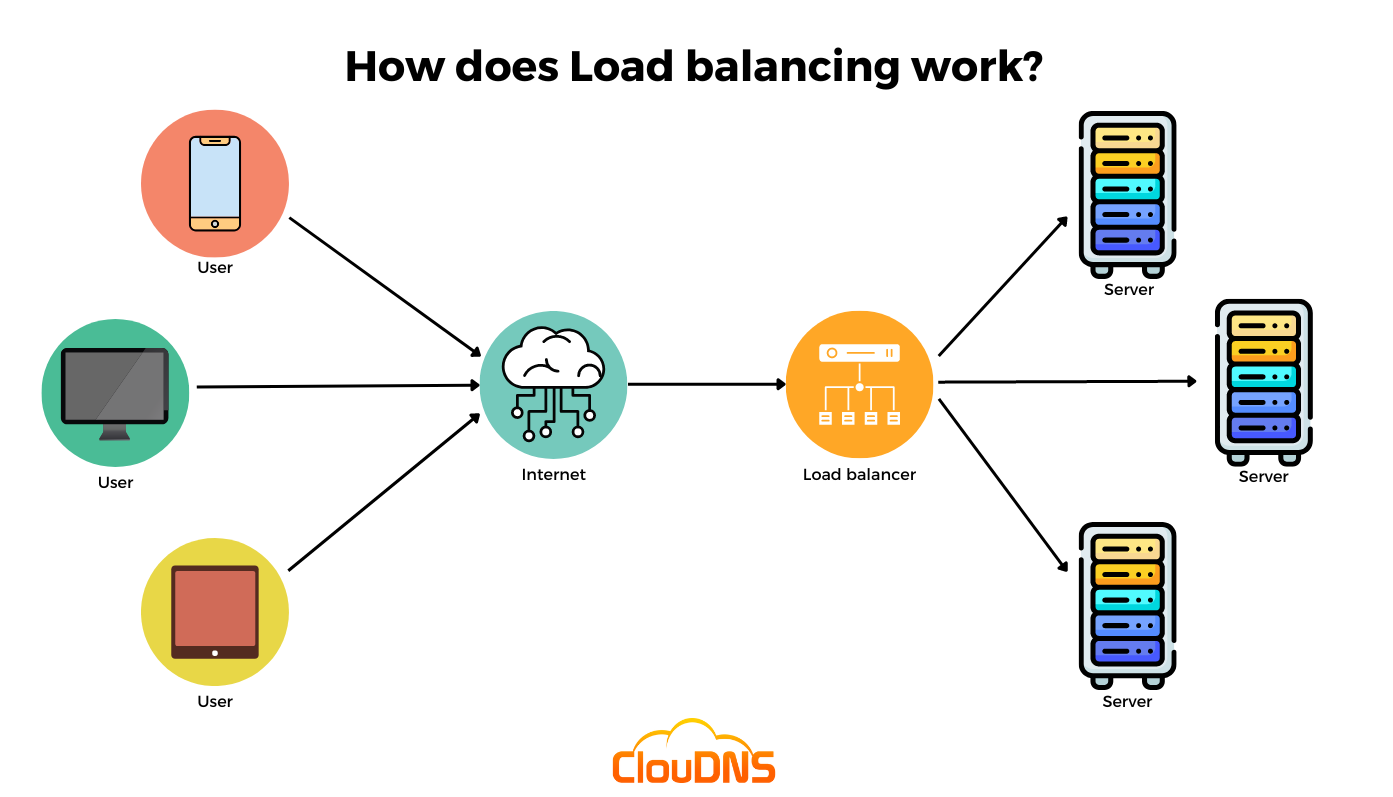
Image reference from: https://www.cloudns.net/blog/load-balancing/
Load Balancing
Load balancing is the process of distributing network traffic across multiple servers. It helps to ensure that no single server is overloaded with too much demand.
Benefits of Load Balancing
Distributes incoming traffic across multiple targets: Load balancing helps distribute the workload across various servers, ensuring that no single server becomes overwhelmed with traffic. This aids in optimizing resource utilization and preventing any particular server from becoming a bottleneck.
Maintains high fault tolerance and high availability to 99.99%: Load balancers can detect if a server is not responding or is experiencing issues and can divert traffic away from it, thus enhancing fault tolerance. By spreading the load across multiple servers, it helps maintain high availability, often measured in terms of uptime (99.99% uptime, for example).
Enhances reliability: Load balancing improves the overall reliability of a system by minimizing the risk of server failure causing a service outage. If one server fails, others can still handle incoming requests, ensuring that the service remains available.
Facilitates scalability: Load balancing facilitates scalability by allowing easy addition or removal of servers based on traffic demands. This adaptability ensures that the system can handle increased traffic without compromising performance.
Offers flexibility in managing traffic: Load balancing provides flexibility in managing traffic. It allows administrators to set rules, prioritize certain types of traffic, and apply different load balancing algorithms based on specific needs.
Improves overall system availability: By distributing traffic across multiple servers, load balancing enhances the availability of the system. Even if one server goes down, the load balancer redirects traffic to other healthy servers, minimizing service disruptions.
Types of Load Balancers
Application load balancing: Complex modern applications have several server farms with multiple servers dedicated to a single application function. Application load balancers look at the requested content, such as HTTP headers or SSL session IDs, to redirect traffic.
For example, an e-commerce application has a product directory, shopping cart, and checkout functions. The application load balancer sends requests for browsing products to servers that contain images and videos but do not need to maintain open connections. By comparison, it sends shopping cart requests to servers that can maintain many client connections and save cart data for a long time.
Network load balancing: Network load balancers examine IP addresses and other network information to redirect traffic optimally. They track the source of the application traffic and can assign a static IP address to several servers. Network load balancers use the static and dynamic load balancing algorithms described earlier to balance server load.
Global server load balancing: Global server load balancing occurs across several geographically distributed servers. For example, companies can have servers in multiple data centers, in different countries, and in third-party cloud providers around the globe. In this case, local load balancers manage the application load within a region or zone. They attempt to redirect traffic to a server destination that is geographically closer to the client. They might redirect traffic to servers outside the client’s geographic zone only in case of server failure.
DNS load balancing: In DNS load balancing, you configure your domain to route network requests across a pool of resources on your domain. A domain can correspond to a website, a mail system, a print server, or another service that is made accessible through the internet. DNS load balancing helps maintain application availability and balancing network traffic across a globally distributed pool of resources.
NGINX as Load Balancer
Example of NGINX configuration to handle load balancing.
upstream hello_project {
    server SOME_IP_ADDRESS;
    server SOME_IP_ADDRESS;
}

server {
    listen 80;
    server_name IP_ADDRESS_OF_CURRENT_INSTANCE;

    location / {
        proxy_pass http://hello_project;
        proxy_set_header X-Forwarded-For $proxy_add_x_forwarded_for;
        proxy_set_header Host $host;
        proxy_redirect off;
    }

    access_log /var/log/nginx/dirs_access.log;
    error_log  /var/log/nginx/dir_error.log;


    location /static/ {
        alias /home/app/web/staticfiles/;
    }
}
How does NGINX handle load balancing?
Nginx employs several load balancing algorithms to distribute incoming requests among the defined upstream servers. The default load balancing method in Nginx is round-robin, but it offers various other methods to suit different scenarios. Some common load balancing algorithms used by Nginx include:
Round Robin (default): Requests are distributed evenly among the upstream servers in sequential order. Each new request is sent to the next server in the list.
Least Connections: New requests are forwarded to the server with the fewest active connections. This method aims to distribute requests based on the current server load.
IP Hash: The hash of the client’s IP address is calculated, and requests from the same IP are consistently sent to the same server. This method is useful for session persistence.
Generic Hash: Similar to IP Hash, but it uses a hash of a custom key, such as a cookie or a specific part of the request, to determine the server to which requests are sent.
Weighted Load Balancing: Servers are assigned different weights, and the load balancer distributes requests according to these weights. Servers with higher weights receive more requests.
Keepalive Connections: Nginx can maintain persistent connections to upstream servers, reusing connections for multiple client requests, reducing overhead and improving performance.
The choice of load balancing algorithm depends on various factors such as the application’s requirements, server capabilities, traffic patterns, and desired behavior. Nginx provides flexibility in selecting the appropriate algorithm to optimize performance and efficiently handle incoming traffic for different use cases.
Services of AWS as a load balancer
We can use various services of AWS to perform load balancing. Shortly, auto scaling and load balancing can be achieved with the help of Ec2 instance, AMI, Launch template, Auto scaling groups.
This video explains in a good way to do that.

Jyoti is trying to be an awesome human being. In spare time he loves to eat and go to new places.